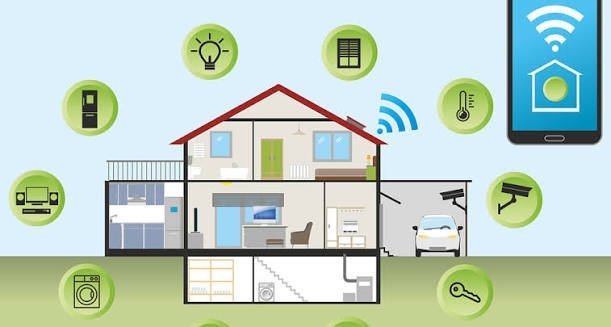
Smart home devices make everyday life easier. From smart cameras and doorbells to voice assistants, smart TVs, and connected lights, these devices offer convenience and control. However, connecting devices to the internet can also create security risks.
Hackers may try to access poorly protected devices, steal personal information, or interfere with your home network. That is why learning how to protect smart home devices is important for every smart home owner.
The good news is that you do not need advanced technical skills to improve your smart home security. A few simple steps can reduce risks and keep your connected devices safer.
1. Change Default Passwords
Many smart home devices come with default usernames and passwords. These login details are sometimes easy to find online.
Using default credentials can make your devices easier targets for hackers.
Create a strong, unique password for every smart device. Avoid using your name, birthday, or simple number combinations.
A good password should contain uppercase letters, lowercase letters, numbers, and special characters.
2. Keep Your Devices Updated
Manufacturers regularly release software updates to fix security problems and improve device performance.
Outdated firmware may contain vulnerabilities that attackers can exploit.
Check your device manufacturer’s application or website for available updates. Enable automatic updates whenever possible.
Remember to update your smart cameras, routers, doorbells, televisions, and other connected devices.
3. Secure Your Home Wi-Fi Network
Your Wi-Fi network connects most smart home devices to the internet. If someone gains unauthorized access to your network, other connected devices may also become vulnerable.
Use WPA2 or WPA3 security on your router. Create a strong Wi-Fi password and change the router’s default administrator credentials.
You should also disable WPS if you do not need it.
A secure Wi-Fi network provides an important layer of protection for your entire smart home.
4. Enable Two-Factor Authentication
Two-factor authentication adds another security step when signing in to an account.
Even if someone discovers your password, they may still need a verification code or another authentication method to access your account.
Enable this feature for smart home applications, cloud storage accounts, and device management platforms.
Whenever available, use an authenticator app or passkey for stronger account protection.
5. Use a Separate Network for Smart Devices
One effective way to improve security is to connect smart home devices to a separate Wi-Fi network.
Many modern routers support guest networks or network segmentation.
You can connect smart cameras, smart plugs, and other Internet of Things devices to this separate network.
This approach can limit communication between your personal computers, phones, and connected household devices.
6. Buy Devices From Trusted Brands
Not all smart home products offer the same level of security.
Before purchasing a device, research the manufacturer and check its security features.
Look for brands that provide regular firmware updates, clear privacy policies, and reliable customer support.
Read customer reviews and check whether the manufacturer has a history of addressing security vulnerabilities.
Choosing reliable products can help reduce future security problems.
7. Review App Permissions
Smart home applications sometimes request access to your microphone, camera, location, contacts, or other information.
However, not every permission is necessary for every device.
Open your smartphone settings and review the permissions granted to smart home applications.
Remove access that is not required for normal operation.
For example, a smart light application may not need access to your contacts or microphone.
Limiting unnecessary permissions helps protect your personal information.
8. Disable Features You Do Not Use
Some smart devices include features that you may never need.
Remote access, voice control, Bluetooth connectivity, and certain cloud services can increase the number of potential security entry points.
Review your device settings and disable unnecessary features.
However, make sure you understand how a feature works before turning it off. Some functions may be important for normal device operation.
9. Monitor Connected Devices Regularly
Regularly checking your home network can help you identify unfamiliar devices.
Most modern routers provide a connected-device list through their administration page or mobile application.
Review this list and check whether every connected device belongs to your household.
If you notice an unknown device, investigate it. Change your Wi-Fi password if you suspect unauthorized access.
Monitoring your network can help you detect suspicious activity early.
10. Protect Your Smart Home Accounts
Your smart home accounts often control several connected devices. If someone gains access to your account, they may be able to control cameras, locks, and other equipment.
Use unique passwords and enable two-factor authentication.
Avoid sharing login details with people who do not need access.
Also, remove old devices and former household members from your account when access is no longer necessary.
Common Smart Home Security Mistakes to Avoid
Even people who follow basic security practices can make mistakes.
Avoid these common problems:
- Using the same password for multiple devices.
- Ignoring important firmware updates.
- Sharing Wi-Fi passwords publicly.
- Buying devices without checking their security features.
- Giving applications unnecessary permissions.
- Leaving unused devices connected to your network.
Avoiding these mistakes can make your smart home safer and more reliable.
Final Thoughts
Smart home technology offers convenience, comfort, and better control over everyday activities. However, connected devices also require proper security practices.
Use strong passwords, update firmware regularly, secure your Wi-Fi network, and enable two-factor authentication. You should also review application permissions and monitor connected devices.
Learning how to protect smart home devices does not have to be complicated. Small security improvements can make a meaningful difference.
By following these ten tips, you can enjoy smart home technology while reducing unnecessary privacy and security risks.