
A sitemap helps search engines understand the structure of your website. It contains important URLs that you want Google to discover and crawl. If you have recently created a website or published new pages, submitting your sitemap can help Google find your content more efficiently.
Google Search Console provides a simple way to submit your sitemap. You do not need advanced technical knowledge to complete the process. In this guide, you will learn how to submit sitemap to Google Search Console step by step.
What Is a Sitemap?
A sitemap is an XML file that lists important pages, posts, images, and other content on your website. It gives search engines information about the URLs that are available for crawling.
For example, a WordPress website may have a sitemap such as:
https://example.com/sitemap_index.xml
The exact sitemap URL depends on the platform and SEO plugin used by your website. WordPress SEO plugins can automatically generate and update sitemap files when you publish new content.
Why Should You Submit a Sitemap?
Submitting a sitemap is useful because it gives Google a clear list of URLs that it can discover. This is especially helpful for new websites, large websites, and websites with frequently updated content.
A sitemap can also help Google discover pages that are not easily reached through internal links. However, submitting a sitemap does not guarantee that every URL will be indexed. Google decides which pages should be crawled and indexed based on several factors.
Find Your Website Sitemap
Before submitting your sitemap, you need to find its URL.
If you use WordPress, your sitemap may be available at:
https://yourdomain.com/wp-sitemap.xml
Some SEO plugins use a different sitemap structure. For example, you may see a sitemap index containing separate sitemaps for posts, pages, or categories.
Open your sitemap URL in a browser first. If it loads successfully and displays your website’s URLs, you can use it in Google Search Console.
How to Submit Sitemap to Google Search Console
Follow these steps to submit your sitemap.
Step 1: Open Google Search Console
First, sign in to Google Search Console. Select the correct website property from the property selector.
Make sure you choose the same domain or URL property that matches your website. If your website has not been added to Search Console yet, you need to verify ownership before continuing.
Step 2: Open the Sitemaps Section
After selecting your website, look at the menu on the left side of the Search Console dashboard.
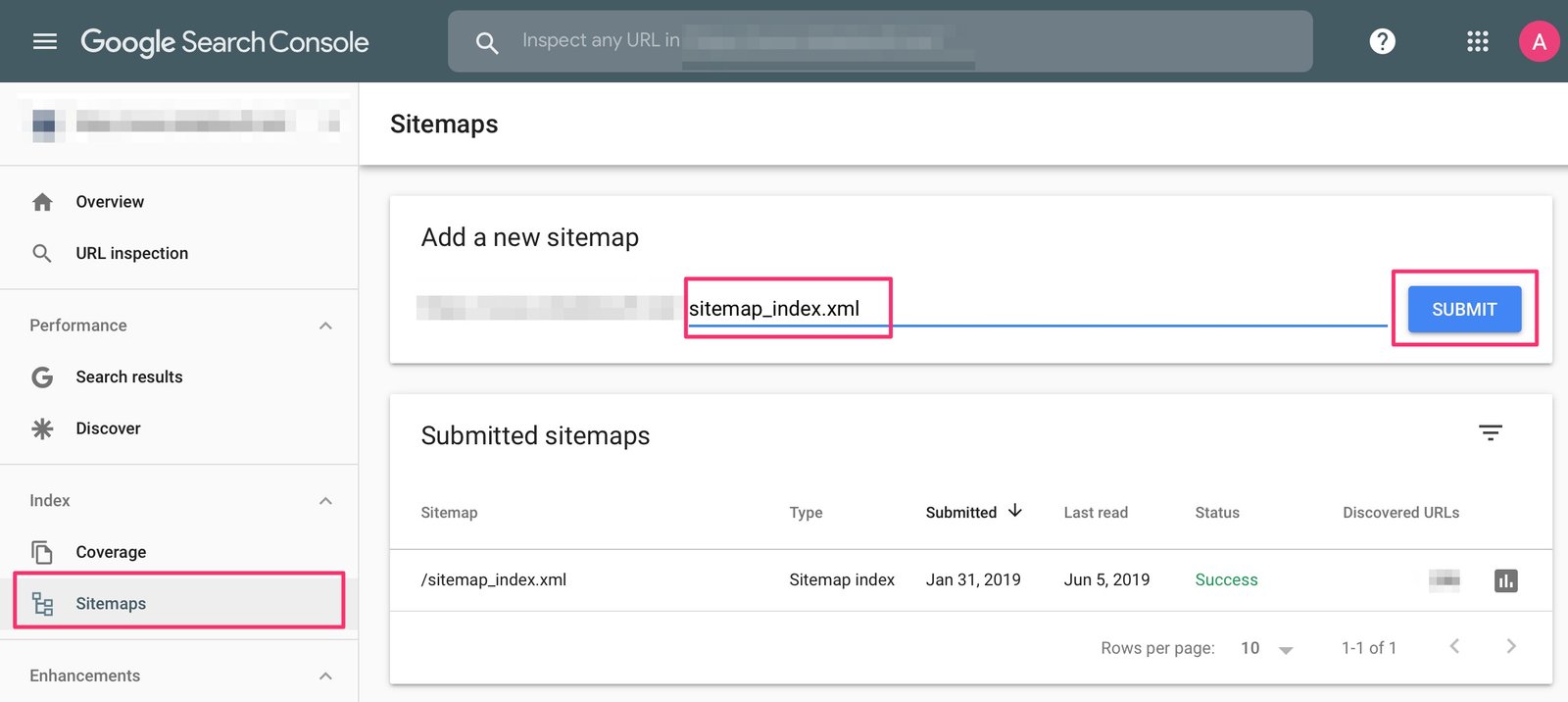
Find and click Sitemaps under the indexing section. You will see a field where you can enter your sitemap URL.
Step 3: Enter Your Sitemap URL
You usually do not need to enter the complete domain name if Search Console has already displayed your website address.
For example, if your sitemap is:
https://example.com/sitemap_index.xml
you may only need to enter:
sitemap_index.xml
Check the sitemap URL carefully before submitting it. A small spelling mistake can cause the submission to fail.
Step 4: Click Submit
After entering the sitemap path, click the Submit button.
Google Search Console will process your sitemap. If the sitemap is accessible and properly formatted, it should appear in the submitted sitemaps section.
You can submit your sitemap to Google Search Console whenever you need to provide Google with a sitemap for your website.
Step 5: Check the Sitemap Status
After submission, check the status shown in Search Console. A successful sitemap submission generally shows a success status.
If Google reports an error, open the sitemap details and review the message. The problem could be caused by an incorrect URL, inaccessible sitemap, server issue, or invalid XML format.
Common Sitemap Submission Problems
Sometimes a sitemap may not be accepted immediately. One common problem is entering the wrong sitemap URL. Always open the sitemap in your browser to confirm that it works.
Another issue can occur when your website blocks Googlebot from accessing the sitemap. Check your robots.txt file and website settings if Google cannot fetch the sitemap.
You should also make sure that your sitemap uses the correct website URL. For example, if your website uses HTTPS, your sitemap should normally use the HTTPS version as well.
What Happens After Submission?
Submitting a sitemap tells Google where your important URLs are located. Google can then fetch the sitemap and use the URLs as a discovery source.
However, sitemap submission does not mean that all pages will appear in Google search results immediately. Crawling and indexing can take time. The process depends on factors such as website quality, crawlability, internal links, and Google’s indexing systems.
You can use the URL Inspection tool in Google Search Console to check individual URLs and request indexing when appropriate.
Final Thoughts
Learning how to submit sitemap to Google Search Console is an important step when setting up and managing a website. The process is straightforward: find your sitemap, open the Sitemaps section, enter the sitemap URL, and submit it.
After submission, monitor the sitemap status in Search Console. Keep your sitemap updated and make sure it contains valid, indexable URLs. With a properly configured sitemap and a crawlable website, you make it easier for Google to discover your important content.